FastAPI - OAuth2+JWT认证
FastAPI - OAuth2+JWT认证
OAuth2只是一种登录验证的模式,JWT只是登陆后生成,用来简化登录操作的token,是Bearer令牌的一种实现
验证token
- 引入OAuth2PasswordBearer,创建该类的示例,这个实例是一个可调用对象,会自动去Header里面找token并返回,如果找不到则抛出401Unauthorize异常
from fastapi.security import OAuth2PasswordBearer
oauth2_scheme = OAuth2PasswordBearer(tokenUrl="token")
- 在需要认证token的路径处理函数里面声明收到token,引入oauth2_scheme依赖项,如果有token则会执行函数体
@app.get("/token-string")
async def get_token_string(token: Annotated[str, Depends(oauth2_scheme)]):
    return {"token": token}
此时只要我们请求头中有token(无论值是什么),就可以访问这个路由了
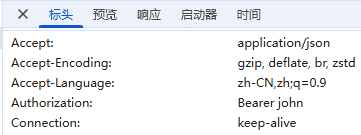
生成token
在创建oauth2_scheme时我们声明了获得token的路径,现在我们编写生成token的具体实现。
OAuth2要求username和password两个必选字段必须通过表单数据的形式发送,也就是设置 Content-Type:application/x-www-form-urlencoded,将数据放在请求体里面
以 grant_type=password&username=john&password=b的形式发送给后端。
为了接收发送过来的参数,可以使用 OAuth2PasswordRequestForm,这是一个类依赖项,可以省略Depends()里面的内容
from fastapi.security import OAuth2PasswordRequestForm
@app.post("/token")
def post_token(form_data:Annotated[OAuth2PasswordRequestForm,Depends()]):
    # 这里可以判断用户登录是否合法,返回响应结果或者抛出异常
    name = form_data.username
    password = form_data.password
    user = user_dict.get(name)
    print(user, name, password)
    if not user:
        raise HTTPException(status_code=400, detail="invalidUser")
    if not password == user.get("password"):
        raise HTTPException(status_code=400, detail="invalidPasswd")
    return {"access_token": name, "token_type": "bearer"}
该路径函数的返回值格式是固定的,是OAuth2规范的一部分。
使用hashedOAuth2
passlib是验证用户登录信息使用的,jwt只使用用户名来创建,与密码无关
from passlib.context import CryptContext

pwd_context = CryptContext(schemes=["bcrypt"], deprecated="auto")
pwd_context.hash(password) # 得到加密后的密码:str
pwd_context.verify(plain_password, hashed_password) # 验证原密码与保存的哈希密码是否相同 :bool
使用JWT
处理JWT令牌,创建用于签名 JWT 令牌的随机密钥。
openssl rand -hex 32
SECRET_KEY = "09d25e094faa6ca2556c818166b7a9563b93f7099f6f0f4caa6cf63b88e8d3e7"
ALGORITHM = "HS256" # 用于签名的算法
ACCESS_TOKEN_EXPIRE_MINUTES = 30 # 令牌过期时间
import jwt
from jwt.exceptions import InvalidTokenError
from datetime import datetime, timedelta, timezone

def create_access_token(data: dict, expires_delta: timedelta | None = None):
    to_encode = data.copy()
    if expires_delta:
        expire = datetime.now(timezone.utc) + expires_delta
    else:
        expire = datetime.now(timezone.utc) + timedelta(minutes=15)
    to_encode.update({"exp": expire})
    encoded_jwt = jwt.encode(to_encode, SECRET_KEY, algorithm=ALGORITHM)
    return encoded_jwt


async def get_current_user(token: Annotated[str, Depends(oauth2_scheme)]):
    credentials_exception = HTTPException(
        status_code=status.HTTP_401_UNAUTHORIZED,
        detail="Could not validate credentials",
        headers={"WWW-Authenticate": "Bearer"},
    )
    try:
        payload = jwt.decode(token, SECRET_KEY, algorithms=[ALGORITHM])
        username: str = payload.get("sub")
        if username is None:
            raise credentials_exception
        token_data = TokenData(username=username)
    except InvalidTokenError:
        raise credentials_exception
    user = get_user(fake_users_db, username=token_data.username)
    if user is None:
        raise credentials_exception
    return user


@app.post("/token")
async def login_for_access_token(
    form_data: Annotated[OAuth2PasswordRequestForm, Depends()],
) -> Token:
    user = authenticate_user(fake_users_db, form_data.username, form_data.password)
    if not user:
        raise HTTPException(
            status_code=status.HTTP_401_UNAUTHORIZED,
            detail="Incorrect username or password",
            headers={"WWW-Authenticate": "Bearer"},
        )
    access_token_expires = timedelta(minutes=ACCESS_TOKEN_EXPIRE_MINUTES)
    access_token = create_access_token(
        data={"sub": user.username}, expires_delta=access_token_expires
    )
    return Token(access_token=access_token, token_type="bearer")
示例
- 版本1:使用OAuth2+普通Bearer token
from typing import Annotated
from fastapi import FastAPI, Depends, Form, HTTPException, status

from fastapi.security import OAuth2PasswordBearer, OAuth2PasswordRequestForm
from fastapi.responses import HTMLResponse
from passlib.context import CryptContext

app = FastAPI()

user_dict = {}
pwd_context = CryptContext(schemes=["bcrypt"], deprecated="auto")


oauth2_schema = OAuth2PasswordBearer(tokenUrl="/token")


@app.get("/", response_class=HTMLResponse)
def get_root():
    return html


@app.post("/users")
def register(form_data: Annotated[OAuth2PasswordRequestForm, Depends()]):
    username = form_data.username
    password = pwd_context.hash(form_data.password)
    user_dict.update({username: {"username": username, "password": password}})
    print(user_dict)
    return user_dict


@app.get("/items")
def get_items(token: Annotated[str, Depends(oauth2_schema)]):
    return user_dict


@app.post("/token")
def login(username: Annotated[str, Form()], password: Annotated[str, Form()]):
    if not (
        username in user_dict
        and pwd_context.verify(password, user_dict.get(username).get("password"))
    ):
        raise HTTPException(
            status_code=status.HTTP_400_BAD_REQUEST, detail="login failed"
        )
    return {"access_token": username, "token_type": "Bearer"}


html = """
<!DOCTYPE html>
<html lang="zh-CN">

<head>
  <meta charset="UTF-8">
  <meta name="viewport" content="width=device-width, initial-scale=1.0">
  <title>Document</title>
</head>

<body>
  <h1>注册用户</h1>
  <form action="/users" method="post">
    用户名:<input type="text" name="username">
    密码:<input type="text" name="password">
    <input type="submit">
  </form>
  <hr>
  <h1>登录</h1>
  <form action="/token" method="post">
    用户名:<input type="text" name="username">
    密码:<input type="text" name="password">
    <input type="submit">
  </form>
</body>

</html>
"""
- 版本2:使用OAuth2+JWT token
相比版本1其实只是换了一下最后返回的token,核心就是添加了一个创建jwt的函数,并且在需要验证时解密,和原值对比
from typing import Annotated
from datetime import datetime, timedelta

from fastapi import FastAPI, Depends, Form, HTTPException, status

from fastapi.security import OAuth2PasswordBearer, OAuth2PasswordRequestForm
from fastapi.responses import HTMLResponse
from passlib.context import CryptContext

import jwt

SECRET_KEY = "09d25e094faa6ca2556c818166b7a9563b93f7099f6f0f4caa6cf63b88e8d3e7"
ALGORITHM = "HS256"  # 用于签名的算法
ACCESS_TOKEN_EXPIRE_MINUTES = 30  # 令牌过期时间

app = FastAPI()

user_dict = {}
pwd_context = CryptContext(schemes=["bcrypt"], deprecated="auto")


oauth2_schema = OAuth2PasswordBearer(tokenUrl="/token")


def create_jwt_token(data:dict, expires: timedelta | None = None):
    data_encode = data.copy()
    if expires:
        delta = datetime.now() + expires
    else:
        delta = datetime.now() + timedelta(minutes=ACCESS_TOKEN_EXPIRE_MINUTES)
    data_encode.update({"exp":delta})
    print(data_encode)
    return jwt.encode(data_encode, SECRET_KEY, ALGORITHM)


@app.get("/", response_class=HTMLResponse)
def get_root():
    return html


@app.post("/users")
def register(form_data: Annotated[OAuth2PasswordRequestForm, Depends()]):
    username = form_data.username
    password = pwd_context.hash(form_data.password)
    user_dict.update({username: {"username": username, "password": password}})
    print(user_dict)
    return user_dict


@app.get("/items")
def get_items(token: Annotated[str, Depends(oauth2_schema)]):
    credentials_exception = HTTPException(
        status_code=status.HTTP_401_UNAUTHORIZED,
        detail="Could not validate credentials",
        headers={"WWW-Authenticate": "Bearer"},
    )
    try:
        username = jwt.decode(token, SECRET_KEY, ALGORITHM).get("sub")
        if not username:
            raise credentials_exception
    except:
        raise credentials_exception
    return user_dict


@app.post("/token")
def login(username: Annotated[str, Form()], password: Annotated[str, Form()]):
    if not (
        username in user_dict
        and pwd_context.verify(password, user_dict.get(username).get("password"))
    ):
        raise HTTPException(
            status_code=status.HTTP_400_BAD_REQUEST, detail="login failed"
        )
    # return {"access_token": username, "token_type": "Bearer"}
    jwt = create_jwt_token({"sub":username})
    return {"access_token": jwt, "token_type": "Bearer"}


html = """
<!DOCTYPE html>
<html lang="zh-CN">

<head>
  <meta charset="UTF-8">
  <meta name="viewport" content="width=device-width, initial-scale=1.0">
  <title>Document</title>
</head>

<body>
  <h1>注册用户</h1>
  <form action="/users" method="post">
    用户名:<input type="text" name="username">
    密码:<input type="text" name="password">
    <input type="submit">
  </form>
  <hr>
  <h1>登录</h1>
  <form action="/token" method="post">
    用户名:<input type="text" name="username">
    密码:<input type="text" name="password">
    <input type="submit">
  </form>
</body>

</html>
"""
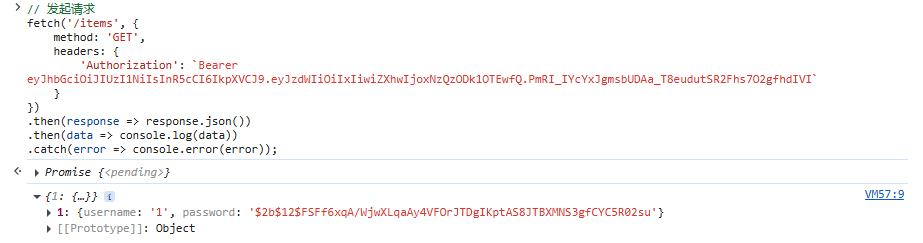
使用控制台手动发送带有token的ajax请求,成功获取到用户数据:
FastAPI - OAuth2+JWT认证
https://starsac.cn/archives/2577a2a8-a980-4c49-a3d2-55838db0cd3c